Soup.video

Workflows ยท Beta

Your playground for
AI media workflows.

Connect AI models, prompts, and creative tools into visual pipelines in Studio. Experiment with new ways to create images and videos, then run your Workflows in Soup or integrate them with the Workflow API.

StudioWorkflowsWorkflow API
A media workflow turning product photos, a creator, and audio into a finished video

Marketplace

Run published workflows

Fill the inputs and run. Build your own in Studio.

Workflow Studio

Design with an easy-to-use inbuilt workflow editor

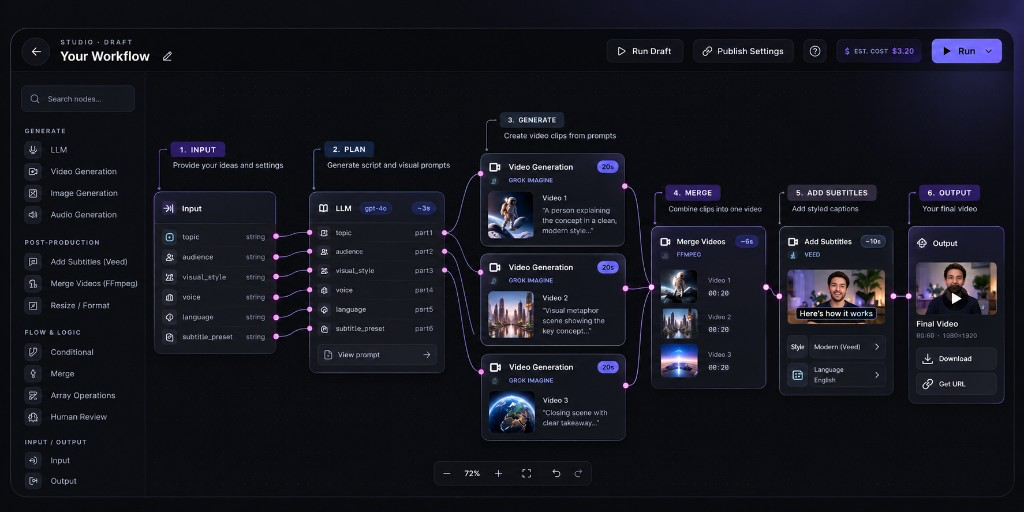
Workflow Studio editor with input, LLM, video generation, merge, and subtitle nodes

1

Build visually with Studio

Connect models and creative operations on the canvas.

2

Publish when ready

Test your workflow, refine it, and publish when you're happy with the results.

3

Run with the Workflow API

Trigger published workflows from your own app.

Pricing

Build for free. Pay for what you run.

Designing and saving in Studio costs nothing. Credits are charged when a Workflow runs, based on the operations performed โ€” in Soup or via the Workflow API.

Wallet and credits

Use every building block.

Drop in all image and video models, then connect merge, subtitle, and logic nodes in Studio.

Video models

Every video model in Soup, on the canvas.

MiniMax H3PixVerse V6Seedance 2.5Flux 3Kling 3.0

Image models

Every image model, including edit models.

Nano Banana 2GPT Image 2.0Qwen ImageSeedream 5

Post-production

Finish the cut without leaving Studio.

Merge VideosAdd Subtitles

Generate & logic

Prompt, branch, and wire the pipeline.

LLMInputOutputConditional

Audio

Soon
VoiceoverSFX

Lip-sync

Soon
Talking headDub

Transcripts

Soon
Speech-to-textCaptions source

Music

Soon
ScoreBed

Build in Studio. Run it with the Workflow API.

Design your workflow visually, then trigger it through the Workflow API. Keep your creative logic in one reusable Workflow instead of rebuilding it inside every application.

Studio

  • โ†’ Connect inputs, AI models, and processing steps.
  • โ†’ Test your workflow in Soup and publish when ready.
  • โ†’ Adjust the process without rewriting your application.

Workflow API

  • โ†’ Trigger a published Workflow you own.
  • โ†’ Pass the same inputs as the Soup form.
  • โ†’ Poll job status and receive the media URL.
curl -X POST https://soup.video/api/v1/workflows/your-slug/runs \
  -H "Authorization: Bearer sk_soup_โ€ฆ" \
  -H "Content-Type: application/json" \
  -d '{"inputs":{"prompt":"A product on marble"}}'
Explore Workflow API docs

Your workflow. Your rules.

Keep Workflows private while you experiment in Studio, refine your process, and integrate it into your own product. Run them in Soup or use the Workflow API.

Private by default

Build in Studio without publishing.

Pay only per run

Free to create.

Ready to integrate

Connect your workflow to your product through the Workflow API.

FAQ

Public listing, indexing, and which AI engines a workflow can pin.

Do I need to sign in to browse workflows?
No. Listed workflows are public and indexable. Sign in when you run a workflow, open Studio, or publish your own.
Which AI engines can a workflow use?
Every listed Soup model โ€” MiniMax H3, PixVerse V6, Seedance 2.5 and 2.0, Flux 3, Kling 3.0, Grok Imagine, Nano Banana, GPT Image, and more. Authors pin models on the canvas; runners only fill the published inputs.
Will Google index my workflow?
Yes, if you publish and list it on Soup (published + public). Drafts and unlisted API-only publishes stay private and send noindex.
Does listing expose my graph?
No. The public page shows title, inputs, cost, and previews โ€” never the node graph or node prompts.

What will you automate first?

Start in Studio. Connect a few steps, publish when ready, then run it with the Workflow API.

Build a workflow

Workflows are in beta. Help shape what comes next.